What this tool does #
PPK Downloader simplifies PPK (Post‑Processed Kinematic) workflows by downloading RTCM base correction data directly from your NTRIP mountpoint.You don’t need to set up and maintain a physical base station for PPK—capture Rover data in the field, then retrieve base RTCM data later from your mountpoint.It supports up to 24 hours of continuous recording and stores files securely in the cloud for 7 days. You can record immediately or schedule a recording for later.
Before you start #
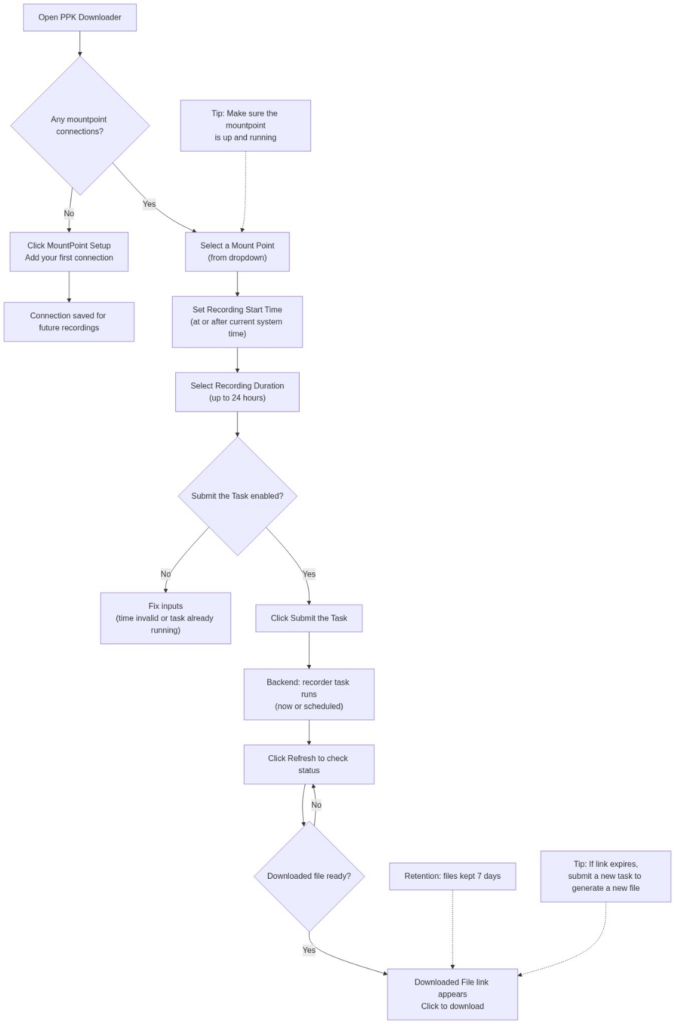
If you don’t have any mount point connections yet, you will see a “No mount point connections yet” message.
- Click MountPoint Setup to add your first NTRIP mountpoint connection.
- The connection settings are saved for future recordings.
> Tip: Make sure the mountpoint you download from is up and running.

Workflow (end‑to‑end) #
- MountPoint Setup (Add/Edit connection)
- Click MountPoint Setup to add or update your NTRIP mount point connection.
2. Select a Mount Point
- Use the Select a Mount Point dropdown to choose the mountpoint you want to record from.
3. Set Recording Start Time
- Choose a Recording Start Time.
- It must be at or after your current system time.
4. Choose Recording Duration
- Select how long you want to record RTCM data (up to 24 hours).
5. Submit & Refresh to Download
- Click Submit the Task to start/schedule the backend recorder task.
- Then click Refresh to check status and retrieve the download link once it’s ready.
- You can leave the page after submitting—the task runs in the backend.
Downloaded File + Refresh #
After submitting a task:
- The downloaded file (e.g., rtcm_data.rtcm3) will appear under Downloaded File when ready.
- Click Refresh to:
- check whether recording has completed
- load the download link once it is available
If the download link expires, simply submit a new task to generate a new file.

Tips / Notes #
- File retention: Files are kept for a limited time (7 days). Download them in time.
- Mountpoint health: If you don’t see a file after refreshing, confirm the mountpoint is up and running and try again.
- Scheduling: You can start immediately or schedule ahead to match your project timeline.
Flowchat #